

16" 3.2K LCD Touch Screen Display Assembly ASUS Vivobook S Flip OLED TN3604y

Request Bulk Quote Are you tax exempt? Display Tech Support Shipping from USA
- SKU:
- B480127-3536
- Condition:
- New
- Availability:
- In stock ready to ship from Union City, NJ USA
- Shipping:
- Real-time Shipping Charges
 International Shipping
- Looking for Local Pick-Up - Print this Pick-Up Slip






Description
.16" 3.2K LCD Touch Screen Display Assembly ASUS Vivobook S Flip OLED TN3604y
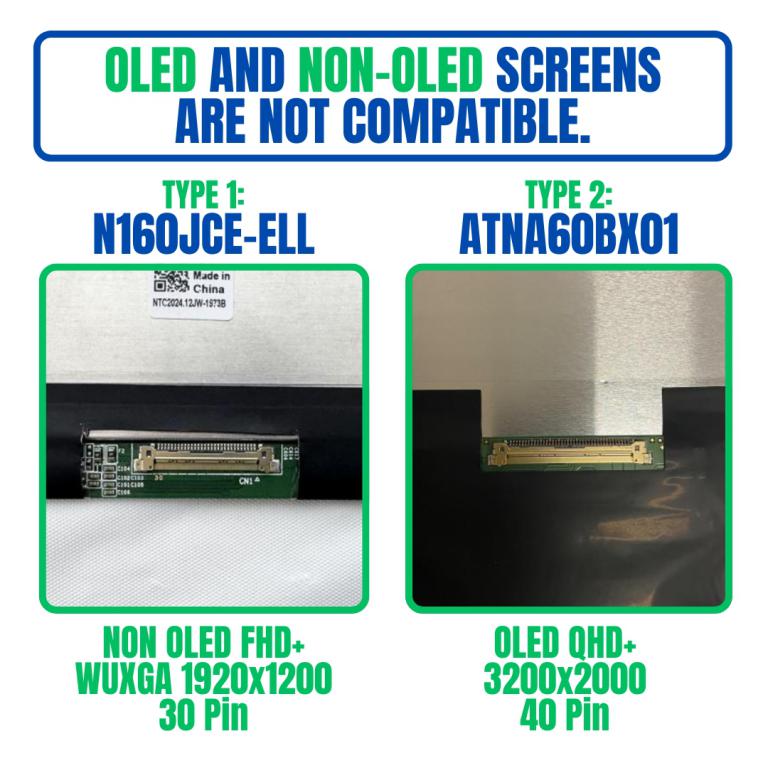
Reference image for screen component differences. Result Because of these differences in wiring, drivers, and power needs, OLED and non-OLED screens are not cross-compatible. You must replace your screen with the same type for it to work properly.
View AllClose
- Brand: Touch Screen Assembly-No Bezel
- Size: 16"

- Resolution: FHD+ WUXGA
- Pixels: 1920 x 1200
- Backlight Type: LED
- Backlight Lamp: DIODE
- Pin Connection: 30 Pins
- Side: Bottom Right
- Finish: Transparent
- Condition: NEW
- Commodity: Touch Screen Assembly-No Bezel
- Technology: Touch
- Smart Pen Compatibility: Inquire for Complete Hinge Up Touch Screen Assembly
- Dead Pixel Policy: In Accordance with ISO 13406-2 norm.
- Source: Factory Direct
- Packaging: Fragile Customized Package
- Compatibility: OEM
N160JCE-ELL Rev. c3
TOG-160SN031AL-FPC-01X
n160jcd-ell rev.c3
TOG-160SN031BF
ATNA60BX01
ATNA60BX01 - TOG-160SN031AL-FPC-01X
TOG-160SN031AL-FPC-01X
n160jcd-ell rev.c3
TOG-160SN031BF
ATNA60BX01
ATNA60BX01 - TOG-160SN031AL-FPC-01X
Asus Vivbook S 16 Flip Tp3604va
Why OLED and Non-OLED Screens Are Not Compatible
Although OLED and non-OLED screens may look similar in size and shape, they are built on different technologies and cannot be swapped.
Key Differences
- Technology: OLED pixels emit their own light; non-OLED (LCD/LED) relies on a backlight to produce brightness.
- Connectors & Drivers: OLED uses different power and signal requirements; non-OLED screens are wired for backlight control instead.
- Power Consumption: OLED panels manage pixel lighting individually; non-OLED requires constant power to the backlight.
- Display Quality: OLED offers deeper blacks, higher contrast, and richer colors; non-OLED provides consistent brightness but is generally less vivid.
Videos
View AllClose
Display Upgrade - Downgrade Experiments
Considering upgrading your existing screen (e.g., 60Hz → 144Hz, FHD → QHD or 4K)?
While some upgrades are possible, they come with compatibility risks — even if the connector matches.
At Bliss Computers, we can help by checking connector compatibility (if in stock) and sharing any known upgrade history.
Do I Need a New Screen?
Work On Data Cable
Work On Display Setting
Work On Software
Work On Screen Calibration
Work On Data Cable (Non Touch) / Digitizer Card (Touch Screen)
Buy New Screen
Buy New Screen + Work On Data Cable
Buy New Screen
Related Products
Related Products

16" 3.2K LCD Touch Screen Display Assembly ASUS Vivobook S Flip OLED TP3604
.16" 3.2K LCD Touch Screen Display Assembly ASUS Vivobook S Flip OLED TP3604 Brand: Unknown GroupsCondition: NEW


16" 3.2K LCD Touch Screen Display Assembly ASUS Vivobook S Flip OLED TN3604
€301.87
.16" 3.2K LCD Touch Screen Display Assembly ASUS Vivobook S Flip OLED TN3604 Brand: Touch Screen Assembly-No BezelSize: 16"

16" ASUS Vivobook S 16 Flip OLED TP3604 3.2K LCD Touch Screen Display Assembly
.16" ASUS Vivobook S 16 Flip OLED TP3604 3.2K LCD Touch Screen Display Assembly Brand: Unknown GroupsCondition: NEW


16" ASUS Vivobook S 16 Flip OLED TN3604 3.2K LCD Touch Screen Display Assembly
€301.87
.16" ASUS Vivobook S 16 Flip OLED TN3604 3.2K LCD Touch Screen Display Assembly Brand: Touch Screen Assembly-No BezelSize: 16"


16" 3.2K OLED LCD Screen Display Panel ASUS Vivobook K3605VU-MX148X Non Touch
€154.31
.16" 3.2K OLED LCD Screen Display Panel ASUS Vivobook K3605VU-MX148X Non Touch